

Many reefer teams know the equipment inside and out but haven’t had much exposure to automated monitoring. Maybe it’s new to your role. Maybe manual rounds have been the standard for years. Either way, automated monitoring has quietly become the backbone of modern reefer operations in terminals around the world.
If your team is still getting familiar with it, you’re in good company.
Let’s break it down.
What is Remote Reefer Monitoring?
Remote reefer monitoring is an automated system that continuously collects temperature, power, and alarm data from refrigerated containers. Instead of relying on manual checks every few hours, the system delivers real‑time visibility, reduces human error, and improves operational efficiency across the terminal.
How Does Automated Reefer Monitoring Work?
Automated monitoring systems rely on three core components:
- Reefer controller — the onboard computer that manages temperature settings and records trip data
- Monitoring devices — hardware that connects to the controller and captures live data
- Software platform — the centralized dashboard that displays conditions, triggers alerts, and supports remote actions
Here’s how these pieces connect to create a fully automated monitoring workflow.
Inside the System: How Automated Reefer Monitoring Operates
1) The Reefer Controller: Where All Data Begins
Every automated monitoring workflow starts with the reefer itself. The onboard controller is the source of all temperature, power, and alarm data.
The controller:
- Manages temperature setpoints
- Records trip data at regular intervals
- Issues alarms when conditions fall outside preset thresholds
Without automation, technicians must physically visit each reefer to read this information and manually enter it into a tablet or log. In large terminals, this can take hours—creating delays, inconsistencies, and missed alarms.

2) Monitoring Devices: How Data Is Collected
Automated monitoring begins when a device connects directly to the reefer’s controller to extract all available data—temperature, humidity, trip records, alarms, and more.
These devices can be:
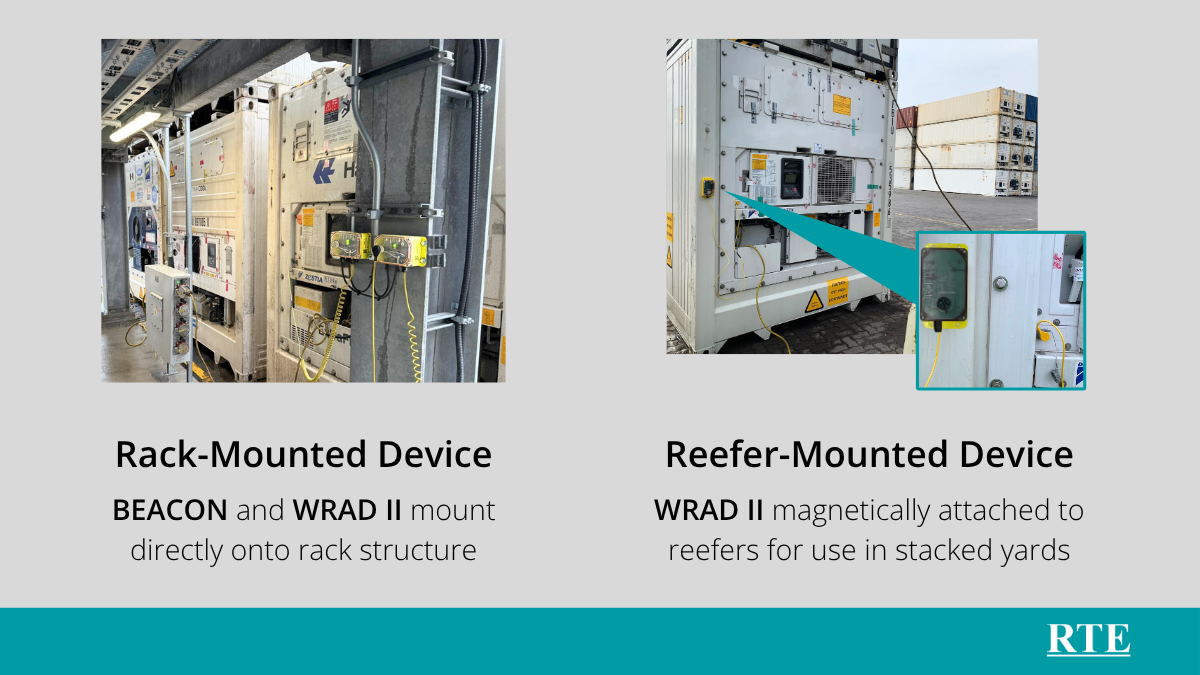
- Rack‑mounted (e.g., BEACON™ Visual Reefer Monitoring)
- Magnetically attached to reefer end frames (e.g., WRAD II™ Wireless Reefer Monitoring)
How they connect:
- When a reefer is plugged into ground power, the technician also connects the monitoring device’s cable to the reefer’s data port.
- In stacked environments, wireless devices eliminate the need for physical rack infrastructure.
This step ensures every reefer becomes a live data source the moment it enters the yard.

3) Connectivity: How Reefer Data Moves Through the System
Reefer → Monitoring Device → Gateway
Once collected, data is transmitted from the monitoring device to a nearby gateway. Transmission methods vary by system:
- Wired (CAN bus) — used by BEACON™ systems
- Wireless (Bluetooth®) — used by WRAD II™ systems
Gateway → Server
Gateways act as the bridge between the reefer yard and the software platform. They send data to the server using:
- Wi‑Fi
- LAN
- Cellular modem
This creates a continuous, two‑way flow of information between the reefer and the monitoring platform.

4) The Software Platform: Real-Time Visibility and Alerts
Once data reaches the server, platforms like GRASP aggregate, analyze, and display it across a centralized dashboard.
The platform:
- Shows real‑time temperature, power, and alarm status
- Triggers instant alerts for deviations or failures
- Notifies personnel via desktop, tablet, mobile, email, or SMS
- Provides a unified view of every reefer in the yard
Because GRASP is a multi‑platform user interface, operators can respond from anywhere—no need to be physically near the reefer.

5) Remote Control & Diagnostics: Taking Action Instantly
Automated monitoring doesn’t stop at visibility—it enables remote action.
With GRASP, operators can:
- Correct temperature setpoints
- Run diagnostics
- Initiate defrost cycles
- Perform PTI checks
- Resolve mismatches between reefer settings and TOS booking data
Example: If a reefer booked for –18°C arrives set to –15°C, GRASP flags the mismatch and allows instant correction—protecting cargo quality and preventing delays.
GRASP also integrates with the Terminal Operating System (TOS), aligning reefer data with yard planning, work orders, and container handling processes.
Why Automated Reefer Monitoring Matters
Manual reefer rounds were built for a different era—one with fewer containers, fewer demands, and far less pressure on accuracy. Automated monitoring meets the reality terminals face today: higher volumes, tighter margins, and zero tolerance for cargo loss.
With continuous visibility, proactive alerts, energy intelligence, and digital documentation, terminals can operate with greater confidence and fewer risks. Automation doesn’t replace the reefer team—it equips them to work smarter, faster, and with far more precision.
See How GRASP Transforms Reefer Operations
If your terminal is ready to move beyond manual rounds, GRASP provides the platform to modernize reefer care and elevate operational performance.
FAQs
What is remote reefer monitoring?
Remote reefer monitoring is an automated system that collects real-time data from refrigerated containers, including temperature, alarms, and power status, without requiring manual inspections.
How does automated reefer monitoring work?
Monitoring devices connect to the reefer controller, collect data, and transmit it through gateways to a platform like GRASP, which provides alerts, dashboards, and remote control capabilities.
How does reefer data improve yard planning?
It shows where reefers actually get plugged in — not just where they were planned to go. This helps planners refine layouts, reduce rehandles, and improve energy distribution.
What are the benefits of automated reefer monitoring for terminals?
Terminals gain real-time visibility, proactive alerts, reduced human error, energy insights, and digital audit trails that support claims protection and operational efficiency.
Can reefer setpoints be adjusted remotely?
Yes. Systems like GRASP allow operators to remotely correct temperature setpoints, run diagnostics, and ensure alignment with TOS booking data.
Latest blog posts

LATAM Reefer Peaks Getting Sharper – And Terminals Are Feeling It First
Reefer flows across LATAM are hitting terminals in sharper bursts. Learn what’s driving the volatility and how automated monitoring strengthens operational resilience.

Where cold-chain failures really happen
Cold‑chain failures hide in the gaps—loading docks, transfers, last‑mile handling. Product‑level temperature data reveals excursions, protects shipments, and gives shippers defensible proof.

Reefer Failures Are Expensive – Automation Stops Them Before They Start
Reefer growth isn’t solved by only adding more plugs. Reefers are live assets that demand real‑time monitoring, not manual checks. Learn why automated visibility, instant alerts, and remote control are now baseline infrastructure for terminals facing rising cold‑chain demand.
Why “More Plugs” Still Isn’t the Solution for Reefer Growth
Reefer growth isn’t solved by only adding more plugs. Reefers are live assets that demand real‑time monitoring, not manual checks. Learn why automated visibility, instant alerts, and remote control are now baseline infrastructure for terminals facing rising cold‑chain demand.